Area of Rectangle Calculator
Calculatorsera.com
Formula: Length × Width
Unlock the Space: Your Fun Guide to the Area of a Rectangle!
Area of Rectangle Calculator Hey there! Have you ever wondered how much paint you need for your bedroom wall? Or how many tiles your school hallway needs? Or maybe you just want to know how much space is on the cover of your favorite notebook?
The secret to all these answers is finding the area of a rectangle.
It sounds fancy, but it’s one of the easiest and most useful things you can learn in math. And the best part? You don’t have to be a math whiz to do it! With our Area of Rectangle Calculator, you can find the answer in a flash.
This guide will make you an area expert. We’ll explain everything in simple, fun words, just like teaching a friend. Let’s dive in!
Table of Contents
What Is an Area of a Rectangle? Space, Please!
First, let’s talk about what a rectangle is. Look around you. Your phone screen, a door, a piece of paper, a window – these are all rectangles! A rectangle is a flat shape with four sides. Its corners are all perfect 90-degree angles (like an “L”), and its opposite sides are the same length.
Now, what is area?
Imagine you’re covering your desk with sticky notes. The area is the total number of sticky notes you need to cover the entire top of the desk without any gaps. In other words, area is the amount of space inside a shape’s boundary.
So, the area of a rectangle is simply how much space is inside it. We measure this space in square units, like square centimeters (cm²), square meters (m²), or square inches (in²). Think of it as counting how of one-unit squares can fit inside the rectangle.
The Super Simple Formula for Area of a Rectangle
Area of Rectangle Calculator Ready for the magic formula? It’s so easy to remember!
Area = Length × Width
That’s it! You just multiply the length of the rectangle by its width. Let’s break it down:
- Length: This is the longer side of the rectangle (usually).
- Width: This is the shorter side of the rectangle (also called breadth).
- Units: This is super important! Your answer will be in “square units.” If you measured length and width in centimeters (cm), your area will be in square centimeters (cm²).
A Quick Example
Imagine your math book is 20 cm long and 15 cm wide. What is the area of the cover?
- Length = 20 cm
- Width = 15 cm
- Area = Length × Width = 20 cm × 15 cm = 300 cm²
So, the area of your book cover is 300 square centimeters! You would need 300 little 1cm x 1cm squares to cover the entire book cover. Easy, right?
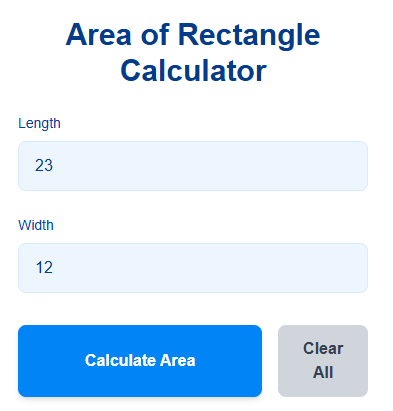
How Does the Area of Rectangle Calculator Work?
Our Area of Rectangle Calculator is like a super-smart friend who does the multiplication for you instantly! It’s a simple tool on our website where you type in two numbers, and it gives you the answer.
You don’t need to worry about the formula or making calculation mistakes. The calculator is programmed to take the numbers you give it for length and width, multiply them together, and instantly show you the correct area. It’s fast, accurate, and saves you a ton of time, especially when you’re dealing with tricky numbers or decimals.
Step-by-Step: How to Use the Online Area of Rectangle Calculator
Area of Rectangle Calculator Using our calculator is as easy as 1-2-3! Here’s a simple guide:
Step 1: Enter the Length
Find the measurement for the length of your rectangle. Type this number into the first box that says “Length.”
Step 2: Enter the Width
Find the measurement for the width of your rectangle. Type this number into the second box that says “Width.”
Step 3: Choose Your Units
Next to the boxes, you’ll see a dropdown menu to select your units. Make sure both length and width are in the same unit! You can choose from centimeters (cm), meters (m), inches (in), feet (ft), etc.
Step 4: Click “Calculate”
This is the fun part! Click the big “Calculate” button.
Step 5: View Your Result Instantly
Like magic, the answer will appear on your screen! It will show you the area in the correct square units. It might also show the calculation it did, so you can learn as you go.
Let’s Calculate By Hand: A Simple Example
Area of Rectangle Calculator While the calculator is awesome, it’s cool to know how to do it yourself. Let’s practice with a simple example.
You have a small whiteboard that is 6 cm long and 4 cm wide. What is its area?
- Identify the Length: 6 cm
- Identify the Width: 4 cm
- Use the Formula: Area = Length × Width
- Do the Math: Area = 6 cm × 4 cm = 24 cm²
So, the area of your whiteboard is 24 square centimeters. See? You just did it!
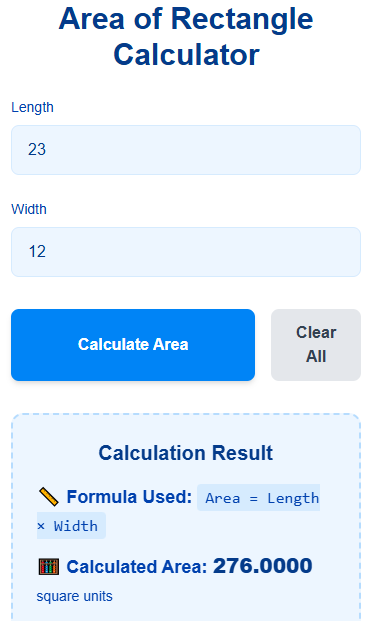
Real-Life Uses of the Rectangle Area Formula
Area of Rectangle Calculator You might be thinking, “When will I ever use this?” The answer is: ALL THE TIME! Here are some real-life situations where knowing how to find the area of a rectangle is super helpful:
- Painting a Wall: Before you buy paint, you need to know the area of the wall to figure out how many paint cans you need.
- Laying a New Lawn or Garden Bed: If you’re planting grass seeds or building a garden, you calculate the area to know how much sod or soil to buy.
- Installing Floor Tiles or Carpet: To figure out how many tiles or how much carpet to purchase for a room, you need to find the floor’s area.
- Wrapping a Gift: The amount of wrapping paper you need depends on the area of the box’s faces.
- Planning a Room Layout: If you want to buy a new rug for your room, you need to know the area of the floor space to get the right size rug.
- School Projects: From poster boards to science fair displays, you often need to calculate areas.
Area vs Perimeter: What’s the Difference?
Area of Rectangle Calculator This is a common mix-up, but it’s very simple!
- Area is the amount of space inside the rectangle (like the grass inside a fenced yard).
- Perimeter is the total distance around the outside of the rectangle (like the fence itself).
Formula for Perimeter of a Rectangle:
Perimeter = (2 × Length) + (2 × Width) OR Perimeter = 2 × (Length + Width)
Example:
Let’s go back to your 6 cm by 4 cm whiteboard.
- Area (the space inside) = 6 × 4 = 24 cm²
- Perimeter (the distance around) = 2 × (6 + 4) = 2 × 10 = 20 cm
One tells you about the covering space, the other tells you about the bordering length.
Units of Area Explained: What Does “Squared” Mean?
Area of Rectangle Calculator We keep saying “square units.” What does that mean?
When we say “square centimeters” and write “cm²,” the little ² means “squared.” It tells us that we are talking about a two-dimensional measurement (covering both length and width).
- 1 cm² is a square that is 1 centimeter long and 1 centimeter wide.
- 1 m² is a square that is 1 meter long and 1 meter wide (a pretty big square!).
- 1 in² is a square that is 1 inch long and 1 inch wide.
So, when you get an answer of 24 cm², it means your rectangle can hold 24 of those little 1cm x 1cm squares.
Visualizing Area: How Size Changes the Space
Area of Rectangle Calculator A picture is worth a thousand words! The chart below shows how the area of a rectangle changes as its length and width change. You can see that as the sides get longer or wider, the area grows really fast! This is why using an online rectangle area calculator is so helpful for bigger projects.
Visualizing Rectangle Areas
Notice how the area grows much faster than the sides!
Doubling both length and width makes the area 4 times bigger!
This chart helps you see how the area gets bigger when you increase the length or the width. For example, a 3×5 rectangle has an area of 15, but a 4×8 rectangle has an area of 32—that’s more than double!
Why You’ll Love Our Area of Rectangle Calculator
Area of Rectangle Calculator So, why should you use our tool instead of just a piece of paper? Here are the top benefits:
- Lightning Fast: Get your answer in less than a second.
- 100% Accurate: No more worries about wrong multiplication.
- Super Easy to Use: The simple design is perfect for students, teachers, and parents.
- Handles All Units: Works with metric (cm, m) and imperial (inches, feet) units.
- Great for Homework & Projects: Double-check your work or solve problems quickly.
- Saves Time: Spend less time calculating and more time on other important things.
Tips & Tricks for Perfect Area Calculations
Become a pro with these simple tips:
- Same Units, Please! Always make sure your length and width are in the same unit before you multiply. If length is in meters and width is in centimeters, convert one of them first.
- Double-Check Your Measurements. A small mistake in measuring can lead to a big mistake in the area. Measure twice, calculate once!
- Dealing with Decimals? No problem! Our Area of Rectangle Calculator can handle decimal numbers perfectly.
- Unit Conversion Tip: To convert centimeters to meters, divide by 100 (since 1 m = 100 cm). So, 250 cm is 2.5 meters.
Frequently Asked Questions (FAQ)
What is the formula for the area of a rectangle?
The formula is Area = Length × Width. It’s the easiest formula in geometry!
Can I enter decimals in the calculator?
Absolutely! You can enter numbers like 5.5 or 12.75. The calculator will give you a precise answer.
What if my length is in feet and my width is in inches?
You need to convert them to the same unit first. For example, convert the width from inches to feet (divide inches by 12) and then use the calculator.
How is area different from perimeter?
Area is the space inside (measured in square units). Perimeter is the distance around the outside (measured in regular units like cm or m).
Is this Area of Rectangle Calculator accurate?
Yes! It provides highly accurate results based on the numbers you input, as long as your measurements are correct.
Can I use this calculator for my school projects?
Of course! It’s a fantastic tool for students to check their homework, understand the concept, and complete projects quickly and accurately.
What does ‘cm²’ mean?
It means “square centimeters.” It represents the number of 1cm by 1cm squares that can fit inside the shape.
Can this be used for squares too?
Yes! A square is just a special type of rectangle where all sides are equal. So, for a square, Area = Side × Side.
Conclusion: You’re Now an Area Expert!
And there you have it! Finding the area of a rectangle is simply about multiplying length and width. It’s a powerful little piece of math that helps us in so many parts of our lives, from gardening to home renovation to schoolwork.
Our Area of Rectangle Calculator is here to make your life easier. It’s free, fast, and fun to use. Whether you’re a student racing against a homework deadline, a teacher setting up a classroom, or a parent helping with a project, this tool is for you.
Why not try it out on our Calculatorsera.com website? We have many other helpful tools too, like our Area of Circle Calculator and our Perimeter Calculator. Check out our main Geometry Calculators page for more!
So, go ahead and measure your room, desk, or wall — it’s fun and easy!
Thank you for reading this post, don't forget to subscribe!