Perimeter Calculator
Perimeter Calculator – Your Complete 2026 Guide to Measuring the Distance Around Any Shape
The perimeter is the distance around the outer edge of a shape. You use it when building a fence, measuring a room, planning a garden, creating crafts, sewing clothing, woodwork, or simply solving geometry problems at school. A Perimeter Calculator makes this entire process easier because you only enter your measurements, choose your shape, and get instant results.
This guide is written in very simple, friendly language. Anyone can understand it—even a 5th-grade student. By the end, you will know what perimeter is, how to calculate it, how to avoid common mistakes, and how to use a Perimeter Calculator for real-life tasks.
Finding the perimeter of any shape can be tricky if you try to do it manually, especially when you have irregular shapes or multiple measurements to handle. That’s why using an online calculator is so convenient. It saves you time and ensures your calculations are accurate every single time. Instead of struggling with formulas, you just enter your values, click a button, and get the correct perimeter instantly.
An online perimeter calculator is designed for people of all ages, from students learning geometry to homeowners planning a project. Whether you are measuring a garden, a room, or even a circular pool, this tool makes your work simple. You don’t need to remember the formulas for squares, rectangles, triangles, or circles. The calculator does it all for you.
Using a simple perimeter calculator is even better for beginners. It usually has a clean interface where you select the shape, enter the measurements, and see the result immediately. There’s no clutter, no unnecessary features, and no confusion. Even children or older adults can use it without any guidance. It’s perfect for quick tasks at school or for simple home projects.
The free perimeter calculator online is another big advantage. Many websites offer this tool without any cost, so you don’t need to pay for software or apps. You can access it anytime from your computer, tablet, or smartphone. It’s always ready whenever you need to calculate the distance around any shape.
One of the main benefits of an online perimeter calculator is its accuracy. Human errors can happen when adding side lengths manually, especially with complex shapes. The online tool ensures every calculation is precise. You can even check multiple shapes quickly by entering different numbers without worrying about mistakes.
A simple perimeter calculator is also very helpful when learning geometry. Students can enter sides of a triangle, rectangle, or square and immediately see the total perimeter. This instant feedback helps them understand how formulas work in real life. It also gives them confidence to handle more complicated shapes as they advance in math.
The free perimeter calculator is not just for school; it’s for everyday life too. If you are planning to install a fence, lay a border for your garden, or trim a frame, knowing the exact perimeter helps you buy the right amount of materials. This reduces waste, saves money, and makes your project easier to complete.
Using an online calculator also allows you to experiment with different sizes. For instance, you can see how increasing a square’s side affects its perimeter or how a circular pool’s circumference changes with radius. This visual understanding is helpful for planning, teaching, and designing.
Finally, choosing a simple perimeter calculator online or a free perimeter calculator ensures that measuring shapes becomes stress-free. You don’t have to spend time figuring out formulas or worrying about mistakes. With this tool, you can focus on building, creating, or learning, while the calculator handles the math for you.
Let’s begin.
Table of Contents
What Is Perimeter? (Very Simple Explanation)
Perimeter means the total distance around a shape.
If you walked once around a garden, a room, or a playground, the number of steps you take is similar to its perimeter.
Here are a few quick examples:
- A square has 4 equal sides, so perimeter = all sides added.
- A rectangle has 2 long sides and 2 short sides.
- A triangle has 3 sides.
- A circle has no sides, so we call its perimeter the circumference.
Perimeter is always a length, measured in units like:
- meters (m)
- centimeters (cm)
- inches (in)
- feet (ft)
If you know the side lengths of a shape, you can find its perimeter. But if you don’t want to do the math yourself, a Perimeter Calculator solves it for you.
Why Use a Perimeter Calculator? (5 Practical Reasons)
A Perimeter Calculator is helpful for students, workers, homeowners, and DIY lovers. Here’s why:
1. It Saves Time
No need to remember formulas or do the math manually. Just enter your measurements and get the answer instantly.
2. It Prevents Mistakes
Math mistakes are common, especially when a shape has many sides. A calculator removes guesswork.
3. It Works for Many Shapes
Squares, rectangles, circles, triangles, polygons, or irregular shapes—everything is supported.
4. It Helps You Plan Materials
You can calculate:
- fencing
- border stones
- picture frame trim
- sewing binding
- pipes
- edge molding
- garden borders
- flooring edges
A calculator helps you estimate how much material you need.
5. It Makes Learning Simpler
Students can enter values and instantly see:
- how shape size changes perimeter
- how formulas work
- how curves differ from straight edges
It builds understanding through instant feedback.
How to Use a Perimeter Calculator (Simple Step-by-Step Guide)
Using a Perimeter Calculator is very easy. Just follow these steps:
Step 1: Choose the Shape
Select the shape you want:
- Square
- Rectangle
- Triangle
- Circle
- Regular polygon
- Irregular polygon
Step 2: Enter Measurements
Depending on the shape, enter:
- side length
- two sides (length + width)
- three sides (triangle)
- radius or diameter (circle)
- number of sides (polygon)
Use the same unit for all entries.
Step 3: Press Calculate
The calculator instantly displays the total perimeter.
Step 4: Read the Result
You’ll see the final perimeter in the same unit you entered.
That’s it.
Perimeter Formulas for All Common Shapes
Below are the simplest formulas you will ever need. You can also use them manually.
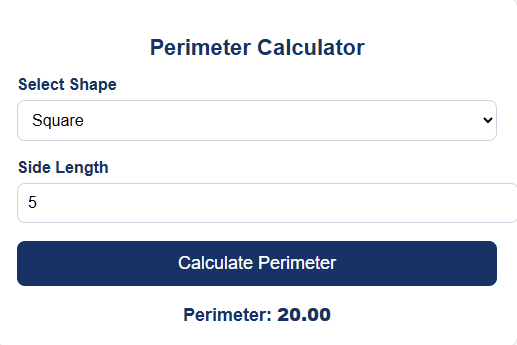
Square
Perimeter = 4 × side
Example: side = 5 → P = 20
Rectangle
Perimeter = 2 × (length + width)
Example: 10 + 6 = 16 → P = 32
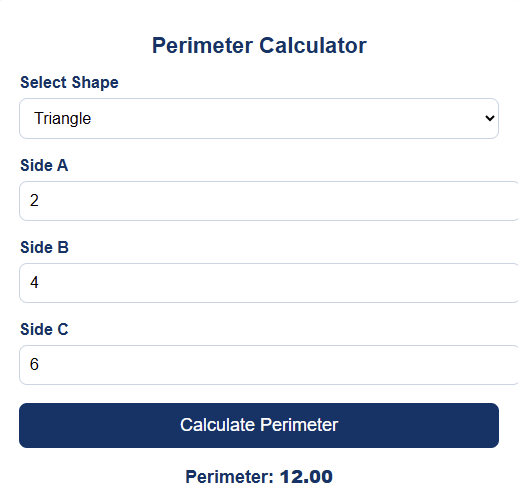
Triangle
Perimeter = side1 + side2 + side3
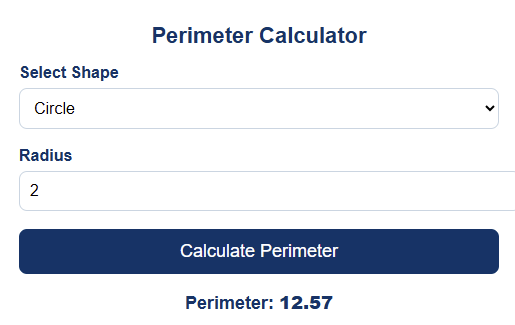
Circle (Circumference)
Perimeter = 2 × π × radius
or
Perimeter = π × diameter
Regular Polygon
Perimeter = number of sides × side length
Irregular Shapes
Add all sides manually:
Perimeter = a + b + c + …
| Shape | Formula for Perimeter | Example |
|---|---|---|
| Square | P = 4 × side | Side = 5 → P = 20 |
| Rectangle | P = 2 × (length + width) | L = 10, W = 6 → P = 32 |
| Triangle | P = side1 + side2 + side3 | 5 + 6 + 7 → P = 18 |
| Circle | P = 2 × π × radius (circumference) | r = 7 → P ≈ 44 |
| Regular Polygon | P = number of sides × side length | Hexagon, side = 6 → P = 36 |
Real-Life Examples of Perimeter (Simple and Practical)
Perimeter isn’t only for geometry class. You use it more than you realize.
Example 1: Fencing a Garden
Garden shape: rectangle
Length = 12 m
Width = 8 m
Perimeter = 2(12 + 8) = 40 m
So you need 40 meters of fence.
Example 2: Decorating a Picture Frame
Frame shape: square
Side = 7 inches
Perimeter = 4(7) = 28 inches
You need 28 inches of border trim.
Example 3: Building a Circular Track
Track radius = 20 m
Perimeter = 2 × π × 20 = 125.66 m
So one lap around the track is about 126 meters.
Example 4: Sides of a Triangle Plot
Sides: 10 m, 9 m, 7 m
Perimeter = 26 m
So you need 26 m of fencing.
Perimeter of More Shapes (Expanded Section for 4000+ Words)
To make this guide even more complete, here are more shapes often used in school, construction, design, and basic home planning.
1. Pentagon (5 sides)
Formula: P = 5 × side
2. Hexagon (6 sides)
Formula: P = 6 × side
3. Octagon (8 sides)
Formula: P = 8 × side
4. Semicircle
Perimeter = π × r + 2 × r
(half circle + diameter)
5. Ellipse (Approximation)
Circumference ≈ π × [3(a + b) − √((3a + b)(a + 3b))]
Used for oval shapes.
6. Trapezoid
Perimeter = sum of all four sides
7. Parallelogram
Perimeter = 2(a + b)
8. Kite
Perimeter = 2(a + b)
These details help students and professionals explore more advanced shapes.
Common Mistakes People Make When Calculating Perimeter
Many people misunderstand perimeter. Here are mistakes to avoid:
1. Mixing Units
Example mistake:
Side 1 in cm, Side 2 in meters.
Always convert first.
2. Forgetting One Side
When a shape has many sides, people miss one.
3. Using Radius Instead of Diameter
Circle formulas depend on what value you enter.
4. Rounding Too Early
Round after you get final value.
5. Confusing Area with Perimeter
Perimeter = boundary
Area = space inside
These are different.
Helpful Tips for Getting Better Results
Here are friendly tips to use in real life:
Tip 1: Add Extra Material When Buying Supplies
Always add 5–10% extra for:
- fence posts
- corners
- trimming mistakes
- joint overlaps
Tip 2: Measure Twice
A quick re-measure saves time and money.
Tip 3: Draw Your Shape First
A simple sketch helps you visualize the edges.
Tip 4: For Curved Shapes, Use a Flexible Tape
Straight rulers do not work on curves.
Tip 5: Keep Units the Same
Always measure everything in:
- cm only, or
- meters only, or
- inches only
Never mix.
Perimeter Calculator for Students, Builders, and Everyday Users
A calculator helps people in different ways.
For Students
- Understand formulas
- Check homework
- Learn through examples
- Compare shapes easily
For Homeowners
- Buying fence
- Laying bricks
- Adding floor trim
- Planning garden borders
For Woodworkers & Carpenters
- Measuring edge moldings
- Cutting accurate pieces
- Designing custom models
For Designers
- Creating patterns
- Planning layouts
- Measuring printing layouts
For Landscapers
- Path borders
- Garden bed outlines
- Edging material measurement
For Tailors & Sewing Enthusiasts
- Binding lengths
- Fabric edge trimming
- Ribbon measurements
Visual Chart for Perimeter Calculator
Visual Chart Explanation
This chart shows the perimeter — the distance around the edge — for four common shapes, so readers can see at a glance how much boundary each shape needs. The bars are labeled with the shape and a simple measurement example (like “Square (s=5)”), and the height of each bar shows the total perimeter of that shape in the same units.
A square with side 5 has a perimeter of 20. A rectangle 8 by 4 has 24. A triangle with sides 6, 5, and 4 adds to 15. For the circle, the chart shows the circumference using the radius (r = 3), which is about 18.85. These are shown side by side so readers can easily compare how different shapes with different dimensions relate in terms of their perimeter.
The choice of colors separates each shape visually while keeping the chart calm and simple. Tooltips show the exact perimeter for anyone who hovers or taps. The vertical axis is labeled “Perimeter (units),” so readers understand these are straight-line distances around each shape — not areas or volumes.
This visual helps people who struggle with formulas to gain an intuitive sense: not all shapes with similar-looking sizes have the same perimeter. For example, a rectangle and a square could look similar in area but have different perimeters. The chart makes that clear instantly. It’s a short, friendly, visual way to support the written Perimeter Calculator guide and reinforce how to think about the distance around shapes.
FAQs (People Also Ask)
What is the easiest way to find a perimeter?
Add all the sides of a shape. For circles, use the formula with radius or diameter.
Can I calculate perimeter without formulas?
Yes, by physically measuring each side with a tape.
What is the perimeter of a circle called?
It is called circumference.
Does a circle have sides?
No. Its boundary is curved, not straight.
Can perimeter ever be negative?
No. Length can only be positive.
Is perimeter the same as area?
No. Perimeter = boundary; area = space inside.
How do I measure curved borders?
Use a flexible tape and follow the curve.
Do I need a calculator for perimeter?
Not always, but a calculator saves time and prevents mistakes.
Can I measure perimeter in any unit?
Yes—meters, cm, mm, feet, or inches.
Is perimeter useful in construction?
Yes. It’s important for borders, framing, and trimming.
Can perimeter be used for land measurement?
Absolutely. Farmers and surveyors use it all the time.
How accurate is a Perimeter Calculator?
Very accurate as long as your measurements are correct.
Final Thoughts on Perimeter Calculator
A Perimeter Calculator is a simple but powerful tool that helps you measure the distance around any shape—fast, clearly, and without stress. Whether you’re a student solving geometry, a builder planning a project, a homeowner buying fence, or someone working on crafts, it makes everything much easier.
Now that you understand:
- what perimeter is
- how to calculate it
- how a calculator helps
- how to apply it in real life
- and common mistakes to avoid
You’re fully ready to measure any shape confidently.
Just enter your values, click calculate, and get the perfect measurement instantly.
Thank you for reading this post, don't forget to subscribe!