All-in-One Profit & Loss Calculator
10 Powerful Reasons to Use a Profit And Loss Calculator (Full 2025 Guide with All Functions)
Running a business, selling products online, or simply checking if a deal made you profit or loss becomes much easier when you have the right tool. That tool is a Profit And Loss Calculator.
A Profit And Loss Calculator helps you find your profit, loss, profit percentage, loss percentage, markup, margin, selling price, cost price, and break-even point — all in one place. This makes your work faster, smarter, and free from mistakes.
Whether you are a student, seller, shopkeeper, reseller, freelancer, small business owner, or someone who buys and sells things, this calculator will help you in many smart ways. Our tool is easy to use, free forever, and gives instant results.
This complete guide will explain everything you need to know in a simple, friendly way. You will learn how each feature works, how to use it, and how it helps you in real life.
Table of Contents
What Is a Profit And Loss Calculator?
A Profit And Loss Calculator is a simple online tool that helps you check:
- Profit
- Loss
- Profit %
- Loss %
- Markup %
- Margin %
- Selling Price
- Cost Price
- Break-Even Point
In short, it tells you the truth about your deal:
👉 Did you gain money?
👉 Did you lose money?
👉 How much?
👉 What percent?
👉 What price do you need to break even?
Instead of solving formulas manually, the calculator does the math for you instantly.
A Simple Example
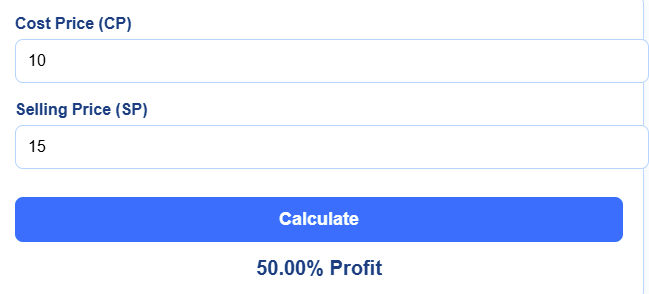
You buy a shirt for $10 and sell it for $15.
Profit = $5
Profit % = 50%
If you sell it for $8:
Loss = $2
Loss % = 20%

This calculator does all of this automatically in less than one second.
Why People Love It
- It is fast
- It is simple
- It gives accurate results
- It works for many types of calculations
- It is free
Why Use a Profit And Loss Calculator Like Ours?
Our All-in-One Profit And Loss Calculator is not just a basic tool. It gives you extra powerful functions, such as:
- Profit / Loss
- Profit %
- Loss %
- Markup %
- Margin %
- Find Selling Price
- Find Cost Price
- Break-Even
Here’s why people love using it:
✔ 1. Saves Time
No need for long formulas. Just enter numbers and get results.
✔ 2. Very Easy to Use
Even a child in 5th grade can operate it.
✔ 3. 100% Accurate
You never have to worry about wrong calculations.
✔ 4. Free Profit Calculator + Free Loss Calculator
You don’t pay anything. No login. No signup.
✔ 5. Online Profit Calculator for All Devices
Works on mobile, tablet, or laptop.
✔ 6. Helps You Make Better Business Decisions
Instant numbers = smarter planning.
✔ 7. Covers All Important Business Calculations
One tool with every feature you need.
✔ 8. Helps Students with Homework
Students can easily check answers for math problems.
✔ 9. Helps Shopkeepers and Resellers
Daily sales? Easy to check your profit or loss.
✔ 10. Includes Break-Even Tool
A rare feature that helps businesses understand when they will start making profit.
How to Use Our All-in-One Profit And Loss Calculator (Complete Guide)
Below are all the functions your calculator has. I will explain each one very clearly.
1. Profit / Loss Calculator
This is the main function.
How It Works
You enter:
- Cost Price (CP)
- Selling Price (SP)
The tool tells you:
- Profit amount
- Loss amount
Example
CP = $50
SP = $70
Result:
Profit = $20

If SP = $40
Loss = $10
2. Profit Percentage Calculator
This section tells you how much profit you made in percentage.
Formula (you don’t need to use it because tool calculates automatically)
Profit % = (Profit / Cost Price) × 100
Example
CP = $100
SP = $130
Profit = $30
Profit % = 30%
3. Loss Percentage Calculator
This tells you what percent of money you lost.
Formula
Loss % = (Loss / Cost Price) × 100
Example
CP = $120
SP = $90
Loss = $30
Loss % = 25%
4. Markup Percentage Calculator
Markup is how much extra money you add over your cost price before selling.
Formula
Markup % = (Profit / Cost Price) × 100
Example:
CP = $50
SP = $65
Profit = $15
Markup % = 30%
5. Margin Percentage Calculator
Margin shows how much profit you keep from the selling price.
Formula
Margin % = (Profit / Selling Price) × 100
Example:
CP = $50
SP = $100
Profit = $50
Margin = 50%
6. Find Selling Price Calculator
This tool helps you find what selling price you need to make a profit.
Inputs
- Cost Price
- Desired Profit %
Example
CP = $200
Profit % wanted = 25%
Selling Price = $250
7. Find Cost Price Calculator
Sometimes you know the selling price but not the cost.
This tool solves it for you.
Inputs
- Selling Price
- Profit % or Loss %
Example
SP = $150
Profit % = 20%
Cost Price = $125
8. Break-Even Calculator
Break-even means the point where:
No profit, no loss.
Just equal.
This tool helps businesses know when they will start making money.
Inputs
- Fixed Costs
- Variable Costs
- Selling Price
Result
It tells you:
- Break-even quantity
- Break-even amount
Step-by-Step Guide to Using the Calculator
Here is how to use the All-in-One tool:
Step 1: Choose the function
Tap any button:
- Profit / Loss
- Profit %
- Loss %
- Markup %
- Margin %
- Find Selling Price
- Find Cost Price
- Break-Even
Step 2: Enter the required values
Example:
- Cost price
- Selling price
- Fixed cost
- Profit %
- etc.
Step 3: Click Calculate
Step 4: Read the result
The answer appears instantly.
Step 5: Reset and try again
That’s it. Very easy.
Real-Life Examples of Using a Profit And Loss Calculator
Here are some simple examples anyone can understand.
Example 1: Shopkeeper Selling Snacks
A shopkeeper buys packets for $5 each and sells them for $7.
CP = $5
SP = $7
Profit = $2
Profit % = 40%
Example 2: Online Seller
A seller buys a mobile cover for $2 and sells it for $4 online.
Profit = $2
Profit % = 100%
Example 3: Student Homework
A student gets a math question:
CP = $500
SP = $400
Loss = $100
Loss % = 20%
The calculator solves it instantly.
Example 4: Break-Even for Small Business
Fixed cost = $5000
Variable cost = $50
Selling price = $100
Break-even quantity = 100 units
Useful for business planning.
Profit & Loss Chart
Profit & Loss Chart
Our Profit & Loss Chart is designed to help you quickly understand your financial data at a glance. With this chart, you can easily compare profits, losses, markup percentages, or margin percentages across different periods. Simply select the type of chart you want from the dropdown menu, and the bars will update automatically to reflect your choice.
Each bar represents a quarter, from Q1 to Q5, and the height of the bar shows the value for that period. The numbers above the bars make it easy to see the exact figures without any confusion. Whether you want to track profits, monitor losses, or check your markup and margin percentages, this chart gives you a clear visual representation.
It’s simple, interactive, and works right in your browser without any extra tools. This makes it perfect for business owners, shopkeepers, or anyone who wants to get a quick snapshot of their financial performance. With just a few clicks, you can see trends, spot changes, and make informed decisions based on the data.
Tips, Mistakes, and Best Practices
Common Mistakes People Make
❌ Entering wrong cost or selling price
Double-check values before clicking calculate.
❌ Forgetting extra costs
Include packaging, transport, or online fees.
❌ Confusing markup with margin
They are different.
- Markup is based on cost
- Margin is based on selling price
❌ Not using break-even
Businesses often forget this important point.
Helpful Tips for Better Results
✔ Add all hidden costs
This gives real profit.
✔ Use calculator before pricing
Don’t guess your selling price.
✔ Compare multiple prices
Check how profit increases or decreases.
✔ Use break-even for planning
It helps you know when your business becomes profitable.
Profit And Loss Calculator for Different Users
1. Students
- Helps solve school problems
- Easy to understand profit/loss
- Gets quick homework answers
2. Teachers
- Helps prepare math examples
- Easy tool for classroom teaching
3. Shopkeepers
- Helps calculate daily profit
- Useful for pricing items
4. Online Sellers
- Calculate profit after shipping
- Helps set correct selling price
5. Business Owners
- Use markup, margin, and break-even
- Helps with cost planning
6. Freelancers
- Track project profit
- Calculate service margin
7. Regular People
Anyone buying or selling anything can use it.
Frequently Asked Questions (FAQs)
How do I use a Profit And Loss Calculator?
Using a Profit and Loss Calculator is extremely simple, even if you are not familiar with financial tools. All you need to do is select the function you want to calculate—such as Profit, Loss, Profit Percentage, Cost Price, Selling Price, Markup, Margin, or Break-Even. Once you choose the function, enter the required values in the given fields. For example, enter your Cost Price and Selling Price if you want to calculate profit or loss. After entering the numbers, click the “Calculate” button and the calculator will instantly show you the results. The tool is designed to be fast, accurate, and beginner friendly, making business calculations hassle-free.
Is this calculator accurate?
Yes, this calculator is built to deliver 100% accurate and reliable results. It uses standard profit and loss formulas that are universally accepted in accounting, finance, and business. Whether you are calculating simple profit margins or evaluating complex break-even points, the tool ensures precision every time. As long as the values you enter are correct, the calculator will always produce mathematically correct outputs.
Can I use it for business?
Absolutely! This Profit And Loss Calculator is perfect for small businesses, shopkeepers, wholesalers, freelancers, traders, and large companies. It helps you determine exact profit margins, selling prices, cost prices, and break-even points, which are essential for smart business decisions. Whether you run an online store or a physical shop, this tool will save time and reduce financial mistakes.
Is it a free Profit Calculator?
Yes, the free profit calculator is completely free to use. There are no hidden charges, subscriptions, or limitations. You can perform unlimited calculations anytime, without paying anything. It was designed to make financial calculations easier and accessible to everyone.
Is it an online Profit Calculator?
Yes, this is a fully online profit calculator that works on any device with an internet connection. You can use it on your mobile phone, laptop, tablet, or desktop without installing software. Simply open the webpage and start calculating instantly.
Can I find the selling price using this tool?
Yes! The calculator includes a dedicated “Find Selling Price” feature that helps you quickly determine the correct selling price based on cost price and desired profit percentage. This is especially useful for shop owners, wholesalers, and eCommerce sellers who need to price their products correctly to maximize profit.
Can I find the cost price?
Yes, you can find the cost price using the “Find Cost Price” option. Just enter the selling price and the profit or loss percentage, and the calculator will instantly determine the cost price. This is ideal when you only know your selling price but want to reverse-calculate the original cost.
Does it calculate break-even?
Yes, the calculator includes a complete break-even feature, which helps you determine the point where your total cost equals your total revenue. This is one of the most important calculations for businesses because it shows how many units you need to sell to avoid loss. It’s very useful for planning, budgeting, and setting sales targets.
Can students use it?
Yes, the calculator is extremely student-friendly. Whether you are studying mathematics, commerce, business, accounting, or preparing for exams, this tool makes learning profit and loss concepts easier. Students can use it to check answers, understand formulas, and practice profit-related questions.
Does it calculate markup and margin?
Yes, both markup and margin calculations are included. With just a single click, you can calculate markup percentage (profit based on cost price) and margin percentage (profit based on selling price). These two metrics are essential for understanding business profitability and pricing strategies, especially in retail and eCommerce.
Is it useful for online sellers?
Yes, this calculator is highly useful for online sellers, including those selling on Amazon, Daraz, Shopify, eBay, Etsy, and social media platforms. It helps determine the right selling price after considering cost, fees, taxes, and profit goals. Online sellers can also check markup, margin, profit percentage, and break-even points to improve pricing and maximize their earnings.
Do I need to install anything?
No installation is required. The calculator runs completely online, meaning you don’t need to download apps or software. Just open the page and start using it immediately. This makes the tool lightweight, fast, and accessible from anywhere.
Final Thoughts on the Profit And Loss Calculator
A Profit And Loss Calculator is one of the most useful tools for anyone who deals with buying and selling. With our All-in-One version, you get every important feature in a single place:
- Profit / Loss
- Profit %
- Loss %
- Markup %
- Margin %
- Find Selling Price
- Find Cost Price
- Break-Even
Everything is simple, fast, and 100% free.
Use this tool to make smarter decisions, avoid mistakes, plan your business, and understand your profit better. Try it now and see how easy your work becomes.
Thank you for reading this post, don't forget to subscribe!