7 Smart Ways to Use a Price Markup Calculator for Faster Profit Planning
When you sell a product or service, knowing the right price can be tricky. You want to make a profit, but you also don’t want to scare away customers with high prices. That’s where a Price Markup Calculator comes in handy.
A Price Markup Calculator is a simple online tool that helps you figure out how much to charge for your products by adding a markup to the cost. Whether you are a small business owner, freelancer, or just someone selling items online, this tool makes pricing easy and accurate.
In this guide, we’ll explain everything about a Price Markup Calculator, how it works, why it’s useful, and how you can use it in real life. By the end, you’ll know how to price your products confidently and maximize your profit without any stress.
Table of Contents
What is a Price Markup Calculator?
A Price Markup Calculator is an online tool that helps you calculate the selling price of a product based on its cost and the percentage of profit (markup) you want to add.
Example:
- You buy a product for $50.
- You want to add a 20% markup.
- Using a Price Markup Calculator, the tool tells you the selling price is $60.
The formula behind the calculator is simple:
Selling Price = Cost Price + (Cost Price × Markup Percentage ÷ 100)
This tool is useful for anyone who sells goods or services because it makes sure you don’t undercharge or overcharge your customers.
A Price Calculator or Markup Calculator is sometimes used interchangeably, but a Price Markup Calculator specifically focuses on adding a profit margin to the cost price.
Why Use a Price Markup Calculator Like Our Online Tool?
Using a free Price Markup Calculator has many benefits:
- Saves Time:
You don’t need to do manual calculations. Just enter the cost and markup percentage, and the calculator instantly shows the selling price. - Accurate Results:
Manual calculations can be prone to errors. The calculator ensures accuracy every time. - Easy to Use:
Even if you are not good at math, the online Price Markup Calculator is very simple. No complex formulas needed. - Free of Cost:
You can use our tool online for free anytime. There’s no need to download anything. - Helps in Business Planning:
Knowing the exact price helps you plan profits, budget costs, and make smarter pricing decisions. - Professional Pricing:
Using a markup calculator makes your pricing look professional and consistent, which can boost customer trust.
How to Use Our Price Markup Calculator Step by Step
Using our online Price Markup Calculator is very simple. Just follow these steps:
- Enter the Cost Price:
Type the amount you paid to buy the product or service. - Enter the Markup Percentage:
Decide how much profit you want to make as a percentage. - Click the Calculate Button:
The calculator will automatically compute the selling price for you. - View the Result:
The tool shows the final selling price. Some calculators also show the profit amount separately. - Adjust if Needed:
If the price seems too high or low, you can change the markup percentage and recalculate.
This simple process ensures that you never make mistakes and can quickly set prices for multiple products.
Real-Life Examples of Using a Price Markup Calculator
Here are some simple examples to show how ordinary people and business owners use a Price Markup Calculator:
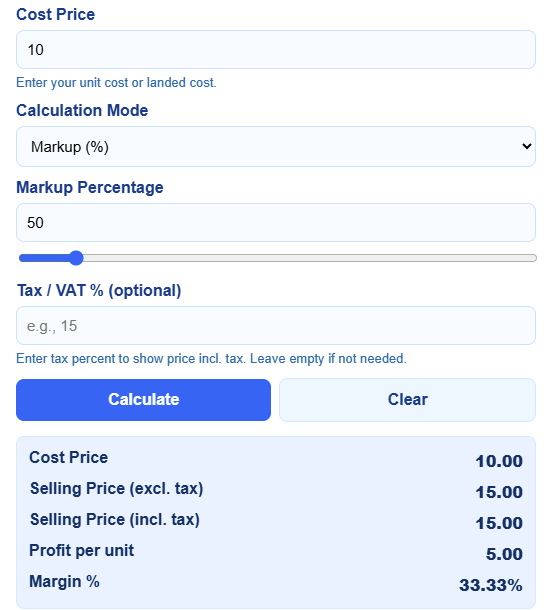
Example 1: Small Business Owner
- Cost of a T-shirt: $10
- Desired markup: 50%
- Selling Price = $10 + ($10 × 50 ÷ 100) = $15
The calculator shows that the T-shirt should be sold for $15 to make a 50% profit.
Example 2: Online Seller
- Buying handmade candles for $5 each.
- Wants to make 40% profit.
- Selling Price = $5 + ($5 × 40 ÷ 100) = $7
The online Price Markup Calculator instantly gives the right price.
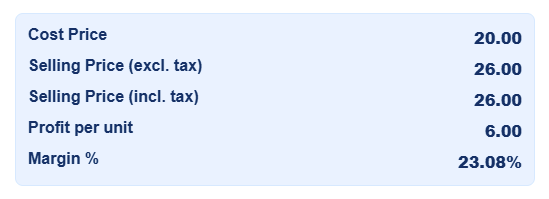
Example 3: Freelancer Services
- Cost of materials for a craft project: $20
- Desired profit: 30%
- Selling Price = $20 + ($20 × 30 ÷ 100) = $26
Using the calculator, freelancers can set fair prices for clients.
Example 4: Grocery Store
- Buying bulk rice for $2 per kg.
- Markup: 25%
- Selling Price = $2 + ($2 × 25 ÷ 100) = $2.50 per kg
Even grocery shops can save time using this free Price Markup Calculator.

Pie Chart
Understanding Profit Distribution with a Pie Chart
Pricing your products and understanding profits can be tricky, especially if you sell multiple items. A Price Markup Calculator can help calculate selling prices, but it’s not always easy to see how each product contributes to your overall profit. This is where a Profit Pie Chart comes in.
A pie chart is a circular chart divided into slices to show proportions. In our case, each slice represents the profit earned from a product. This visual tool instantly shows which products bring in more profit and which may need pricing adjustments.
Why Use a Pie Chart for Profits?
- Visual Clarity:
Numbers alone are abstract. A pie chart makes profits tangible. You can see the percentage each product contributes to total profit at a glance. - Quick Decision-Making:
It’s easier to identify high-profit and low-profit products, helping you make faster decisions on pricing or marketing. - Effective Planning:
By visualizing profit distribution, you can plan better for stock, promotions, or sales strategies. - Educational Tool:
Students, beginners, or small business owners can easily understand profit allocation without complex formulas.
How to Read the Profit Pie Chart
- Slices: Each slice represents the profit contribution of one product.
- Size of Slice: The bigger the slice, the higher the profit from that product.
- Colors: Different colors make it easy to distinguish products.
- Tooltips: Hover over a slice to see exact profit amounts.
Example:
- Product A contributes $25
- Product B contributes $15
- Product C contributes $30
- Product D contributes $10
- Product E contributes $20
The chart immediately shows that Product C is your most profitable, while Product D contributes the least. This visualization is much easier to interpret than a table of numbers.
Real-Life Example for Small Business Owners
Imagine you run an online store selling handmade soaps. Each soap has a different cost and markup:
| Product | Cost Price ($) | Selling Price ($) | Profit ($) |
|---|---|---|---|
| Lavender Soap | 2 | 3 | 1 |
| Rose Soap | 2.5 | 4 | 1.5 |
| Lemon Soap | 1.5 | 3 | 1.5 |
| Mint Soap | 2 | 2.5 | 0.5 |
| Jasmine Soap | 3 | 4 | 1 |
Using this data in a pie chart:
- You can see which soap gives the highest return (Rose and Lemon).
- Mint soap may need a higher markup or cost adjustment.
- It helps plan promotions or inventory efficiently.
Tips for Using a Pie Chart Effectively
- Update Regularly:
Your costs and profits may change. Update the chart to reflect current data. - Combine With Calculator:
Use a Price Markup Calculator first to get accurate profits, then visualize them with a pie chart. - Limit the Number of Slices:
Too many slices can make the chart cluttered. Focus on your top products or group smaller products as “Others.” - Use Contrasting Colors:
Different colors for slices make it easier to understand at a glance. - Highlight Key Products:
You can emphasize high-profit products by using brighter colors or exploding slices slightly (optional in Chart.js).
Common Mistakes to Avoid
- Ignoring Hidden Costs:
Always include shipping, packaging, and taxes in your profit calculation. Otherwise, your chart may overestimate profits. - Using Too Many Small Products:
If you have 50+ products, don’t try to show them all in one chart. Group smaller ones for clarity. - Neglecting Market Prices:
High profit may not always mean competitive pricing. Balance profit and market demand.
Benefits for Different Users
Students:
- Learn business math visually.
- Understand profit distribution in projects.
Small Business Owners:
- Quickly assess product profitability.
- Make pricing or promotion decisions effectively.
Freelancers or Service Providers:
- Compare profits from different services.
- Decide which service is worth offering more.
Shopkeepers and Online Sellers:
- Visualize top-selling or high-profit products.
- Improve inventory planning and sales strategy.
Advanced Tips for Professionals
- Add Percentages:
Show percentage contribution of each product in tooltips or labels. - Combine with Other Charts:
Use a bar chart alongside the pie chart to see cost, selling price, and profit in one view. - Export for Reports:
You can export pie charts as images for business reports, presentations, or financial planning. - Dynamic Updates:
Integrate the chart with your online calculator for real-time profit visualization.
Conclusion
A Profit Pie Chart combined with a Price Markup Calculator is a powerful tool for anyone selling products or services. It simplifies pricing, provides clear visual insights, and helps make smart business decisions.
By using this chart:
- You can see which products are most profitable.
- Make better pricing and promotion decisions.
- Save time and reduce calculation errors.
For small business owners, freelancers, online sellers, and even students, this combination of a calculator and a chart is invaluable. Try it now and start visualizing your profits like a pro!
Tips, Mistakes, and Best Practices
Common Mistakes People Make with a Price Markup Calculator
- Entering the Wrong Cost Price:
Always double-check your cost price before calculating. - Confusing Markup with Discount:
Markup adds profit; discount reduces price. Don’t mix them up. - Ignoring Hidden Costs:
Some products have extra costs like shipping or taxes. Include them for accurate pricing. - Overpricing or Underpricing:
Avoid setting very high or low markup percentages without market research.
Helpful Tips to Get Better Results
- Always include all costs in the calculation.
- Compare your price with competitors.
- Adjust markup based on demand, season, or customer type.
- Use the calculator regularly for new products.
- Keep markup percentages consistent for similar products.
Price Markup Calculator for Different Users
This calculator is useful for many types of users:
Students:
- Can use it for school projects or learning about business math.
Small Business Owners:
- Quickly calculate prices for products to make a profit.
Freelancers:
- Determine service rates based on material costs and effort.
Shopkeepers:
- Set prices for grocery, electronics, or fashion items easily.
Online Sellers:
- Use it for e-commerce stores to price products competitively.
Anyone Selling Goods or Services:
- Helps ensure fair pricing and avoids losses.
Frequently Asked Questions (FAQs)
How do I use a Price Markup Calculator?
Enter the cost price, choose your markup percentage, and click calculate. The selling price appears instantly.
Is a Price Markup Calculator accurate?
Yes, it gives precise results as long as you input the correct cost and markup.
Can I use it for online selling?
Absolutely! It is perfect for online stores and marketplaces.
Is there a free Price Markup Calculator online?
Yes, our tool is free and easy to use anytime.
What is the difference between markup and profit?
Markup is the percentage you add to cost price. Profit is the money you make after selling.
Can I calculate discounts with this tool?
No, this tool is for adding markup, not discounts.
How do I choose the right markup percentage?
Consider your costs, competitor prices, and desired profit.
Can I use it for services too?
Yes, it works for products and services alike.
Is it suitable for beginners?
Definitely. The calculator is simple and beginner-friendly.
Does it include taxes?
Some calculators allow tax addition; check the tool’s features.
Can I save my calculations?
Most online calculators display results instantly; you can copy them for records.
Can it help with bulk products?
Yes, you can calculate prices for multiple units quickly.
Conclusion: Why a Price Markup Calculator Is Essential for Smarter Pricing Decisions
Setting the right price is one of the most critical steps in running a profitable business, regardless of whether you manage an online store, a small shop, or a large company. A Price Markup Calculator eliminates confusion, saves valuable time, and gives you the confidence to price your products accurately and competitively. Throughout this guide, we explored how markup works, why it matters, and how a simple calculator can dramatically improve your decision-making process.
One of the biggest mistakes business owners make is confusing markup with margin, and this often leads to underpriced items and reduced profitability. The Price Markup Calculator solves this issue by giving you instant, error-free results without having to manually compute anything. Whether you’re adding a fixed percentage, experimenting with different profit levels, or comparing pricing scenarios, the tool ensures you always stay on the right track.
This tool is especially valuable for businesses that juggle frequent price updates, seasonal sales, supplier cost changes, or increased competition. Instead of guessing or relying on traditional spreadsheets, the calculator helps you test different markups in real time. This flexibility allows you to respond quickly to market changes while maintaining profitability.
Another major advantage of using an online Price Markup Calculator is accessibility. It works instantly, requires no installation, and can be used from any device. Whether you are a startup founder, freelancer, retailer, or service provider, the calculator gives you a clear picture of how much you should charge to achieve your desired profit. It also prevents the common errors that occur when trying to calculate prices manually, especially when dealing with complex product lists or multiple cost variations.
Ultimately, the Price Markup Calculator is not just a tool—it is a powerful asset for creating a sustainable pricing strategy. By using it consistently, you can make well-informed decisions, price confidently, and ensure long-term growth for your business. Pricing becomes less about guesswork and more about strategy. No matter what industry you operate in, accurate markup calculations will always play a key role in maximizing revenue and maintaining a healthy profit margin.
If you want to grow your business faster, improve your pricing accuracy, and simplify your workflow, using a reliable Price Markup Calculator is one of the smartest steps you can take.
Final Thoughts on Price Markup Calculator
A Price Markup Calculator is a simple, powerful tool that helps anyone selling products or services set the right prices. It saves time, avoids mistakes, and ensures you make a fair profit.
Whether you are a small business owner, freelancer, student, or online seller, this free Price Markup Calculator is a must-have. By using it regularly, you can plan profits smarter, price products professionally, and focus more on growing your business.
Don’t guess your prices anymore. Try our online Price Markup Calculator now and see how easy pricing can be!
Thank you for reading this post, don't forget to subscribe!