Distance Formula Calculator
Calculatorsera.com
Your Ultimate Guide to the Distance Formula Calculator
Have you ever looked at a map and wondered, “How far is it, really, from my house to my friend’s?”
Or maybe you’ve been in math class, staring at a graph with two dots, and your teacher asks for the distance between them. You start thinking about rulers and measuring… but there’s a much better way.
What if you could find that exact distance in seconds?
That’s exactly what a Distance Formula Calculator is for! It’s a super-smart online tool that does the math for you. No more guesswork. No more complicated calculations.
In this fun and easy guide, we’ll break down everything you need to know. We’ll explore what the distance formula is, why this calculator is your new best friend for math homework, and how you can use it in real life—from planning a treasure hunt on a playground to understanding sports strategies.
Ready to become a distance-finding expert? Let’s dive in!
Table of Contents
What Is a Distance Formula Calculator?
Let’s keep it simple.
A Distance Formula Calculator is a free online tool that finds the straight-line distance between two points on a flat surface (like a graph or a map) using their coordinates.
You know those (x, y) points you see in geometry? This calculator uses them.
You just type in the coordinates for your first point and the coordinates for your second point. Then, you click “Calculate.” Poof! The exact distance appears instantly.
It’s like magic, but it’s really just smart math made easy. It saves you time, eliminates those pesky calculation errors, and helps you understand the concept behind the numbers.

Why Should You Use a Distance Formula Calculator?
You might be thinking, “I can just do the math myself.” And you absolutely can! But there are some fantastic reasons to use a calculator.
- It’s Lightning Fast: Why spend 5 minutes calculating when you can get the answer in 5 seconds? This is a huge time-saver, especially when you have multiple problems to solve.
- It’s Super Accurate: Even the best of us make mistakes. Forgetting to square a number or missing a negative sign can throw the whole answer off. The calculator is precise every single time.
- It’s a Learning Tool: By using the calculator to check your work, you can confirm you’re on the right track. It builds your confidence and reinforces your understanding.
- It’s for Everyone: Whether you’re a student struggling with geometry homework, a teacher creating lesson plans, an engineer designing a new structure, or a gamer plotting a path in a virtual world, this tool is for you.
The Distance Formula Explained: No More Fear!
Distance Formula Calculator Before we get to the calculator, let’s understand the engine under the hood: the actual distance formula. Don’t worry, we’ll make it fun.
The formula looks like this:
Distance (d) = √[(x₂ – x₁)² + (y₂ – y₁)²]
Whoa, hold on! That might look like alphabet soup right now. Let’s translate it into plain English.
- (x₁, y₁) are the coordinates of your first point. Let’s call it Point A.
- (x₂, y₂) are the coordinates of your second point. Let’s call it Point B.
The formula is basically saying this:
- Subtract the X’s: Find the difference between the x-coordinates (x₂ – x₁).
- Subtract the Y’s: Find the difference between the y-coordinates (y₂ – y₁).
- Square Them: Square both of those differences (multiply them by themselves).
- Add Them Up: Add the two squared results together.
- Square Root: Take the square root of that final sum.
And there you have it—your distance!
A Fun Analogy: The Playground Grid
Imagine your school playground is a giant grid. You are standing at point (2, 3). Your friend is at point (5, 7).
You can’t walk diagonally across the grass? Well, in math, you can! The distance formula finds that exact “as-the-crow-flies” shortcut.
The math behind it is actually the famous Pythagorean Theorem in disguise! You’re basically finding the hypotenuse of a right-angled triangle. If you’re curious about that connection, you can check out our [Pythagorean Theorem Calculator] to see how it all links together.
How Our Distance Formula Calculator Works: A 30-Second Guide
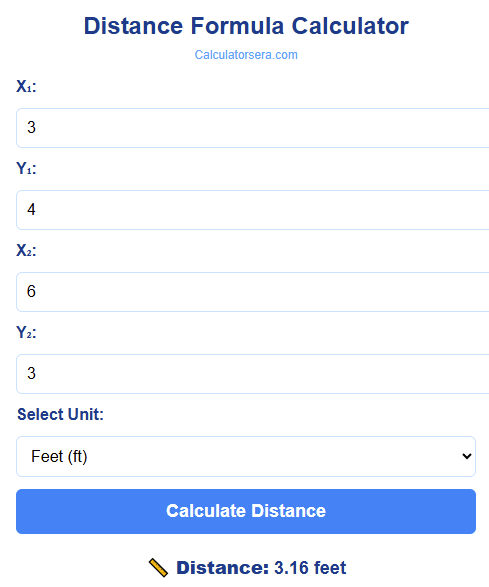
Distance Formula Calculator Using our calculator is as easy as 1-2-3. Here’s how you do it:
Step 1: Enter the coordinates of your first point. Type the x-value (x₁) and the y-value (y₁) into the first set of boxes.
Step 2: Enter the coordinates of your second point. Type the x-value (x₂) and the y-value (y₂) into the second set of boxes.
Step 3: Click the “Calculate” button.
Step 4: Voila! The straight-line distance between your two points appears instantly below.
It’s that simple. No fuss, no confusion. Just a quick and accurate answer.
Visualizing the Distance: See the Points on a Graph
A picture is worth a thousand words, right? Let’s look at a chart to see what we’re calculating. The graph below shows two points and the line representing the distance between them.
This chart helps you see the points and the straight-line distance between them. It turns abstract numbers into something you can actually see!
Step-by-Step Calculation Examples
Distance Formula Calculator Let’s walk through a few examples, both with and without the calculator, to make sure you’ve got it.
Example 1: The Simple One
Problem: Find the distance between Point A (2, 3) and Point B (5, 7).
Manual Calculation:
- Identify the coordinates:
- x₁ = 2, y₁ = 3
- x₂ = 5, y₂ = 7
- Plug into the formula:
d = √[(5 – 2)² + (7 – 3)²] - Calculate the differences:
d = √[(3)² + (4)²] - Square them:
d = √[9 + 16] - Add them:
d = √[25] - Take the square root:
d = 5
Answer: The distance is 5 units.
Using the Calculator: You’d simply type 2 and 3 for the first point, then 5 and 7 for the second point. Click calculate, and you’ll see the answer “5” instantly.
Example 2: Dealing with Negative Numbers
Problem: Find the distance between Point A (-1, 4) and Point B (3, 1).
Manual Calculation:
- Coordinates:
- x₁ = -1, y₁ = 4
- x₂ = 3, y₂ = 1
- Plug into the formula:
d = √[(3 – (-1))² + (1 – 4)²] = √[(3 + 1)² + (-3)²] - Calculate:
d = √[(4)² + (-3)²] = √[16 + 9] = √25 = 5
Answer: The distance is 5 units.
See? Negative signs aren’t scary. The calculator handles them perfectly. Just type -1 and the tool knows exactly what to do.
Example 3: A Real-Life Scenario
Problem: You’re planning a rectangular garden. You’ve placed a marker for a tomato plant at (10, 15) on your grid map (in feet). Your rose bush marker is at (4, 8). What is the straight-line distance between them?
Using the Calculator:
- First Point: x₁ = 10, y₁ = 15
- Second Point: x₂ = 4, y₂ = 8
- Click Calculate.
The calculator does the work:
d = √[(4-10)² + (8-15)²] = √[(-6)² + (-7)²] = √[36 + 49] = √85 ≈ 9.22
Answer: The tomato plant and rose bush are about 9.22 feet apart.
This is super useful for planning! If you’re also working on a project that involves the area of a space, our [Area of Triangle Calculator] can be a great companion tool.
The Awesome Benefits of Using This Calculator
We’ve touched on this, but let’s really drive it home. Why is this tool so great?
- Error-Free Results: Say goodbye to simple arithmetic mistakes. The calculator guarantees accuracy.
- Massive Time Savings: Get your answer in a flash and move on to the next problem or the next part of your project.
- Understanding and Confidence: It’s a fantastic way to check your manual work. When your answer matches the calculator’s, you know you’ve mastered the concept!
- Handles All Numbers: It works seamlessly with positive numbers, negative numbers, decimals, and fractions. No number is too tricky.
- Accessible Learning Aid: It supports students of all levels, making a key geometry concept less intimidating and more approachable.
Real-Life Applications of the Distance Formula
This isn’t just a math class thing. The distance formula is used all around you!
- Navigation and GPS: This is the biggest one! GPS apps on your phone use a more complex 3D version of this formula to calculate the shortest distance between your location and your destination.
- Sports Analytics: Ever wonder how far a soccer player ran during a game? Sportscasters use tracking technology and the distance formula to calculate player movement on the field.
- Engineering and Architecture: When designing a building, a bridge, or even a new product, engineers need to calculate precise distances between components. This formula is fundamental to their blueprints.
- Computer Graphics and Gaming: In video games and animations, the formula is used to detect collisions between objects, calculate how far a character can jump, and render realistic environments.
- Urban Planning: City planners use it to measure distances between landmarks, plan new roads, and optimize public transportation routes.
Common Mistakes to Avoid (And How the Calculator Helps)
Distance Formula Calculator When doing it by hand, it’s easy to slip up. Here are the most common mistakes:
- Mixing Up x and y Coordinates: Always double-check that you’ve put the right numbers in the right places. The calculator has labeled boxes to prevent this!
- Forgetting to Square the Differences: Remember, it’s (x₂ – x₁)², not (x₂ – x₁). Squaring is a crucial step.
- ** mishandling Negative Signs:** A common error is: (3 – (-1)) = 3 – 1 = 2. Wrong! It’s 3 + 1 = 4. The calculator performs this operation correctly every time.
- Skipping the Square Root: The final step is the square root (the √ symbol). Don’t forget it! The calculator automatically includes this step.
Tips for Using the Distance Formula Calculator Effectively
To get the most out of this tool, keep these tips in mind:
- Double-Check Your Inputs: Before hitting “calculate,” take one quick look to ensure you’ve typed the coordinates correctly.
- Understand the Order: It doesn’t matter if you call (2,3) Point A and (5,7) Point B, or vice-versa. The distance will be the same because you’re squaring the differences.
- Use it for Verification: Try solving the problem by hand first, then use the calculator to check your answer. This is the best way to learn.
- Combine with Graphing: For a deeper understanding, plot the points on a graph paper and see the distance line. It connects the visual with the calculation.
Frequently Asked Questions (FAQs)
What is the distance formula in simple terms?
It’s a math recipe to find the shortest straight-line distance between two points on a graph using their x and y coordinates.
Can this calculator work for 3D coordinates?
The standard distance formula calculator on our site is for 2D points (x, y). The formula for 3D (x, y, z) is a bit longer: d = √[(x₂-x₁)² + (y₂-y₁)² + (z₂-z₁)²]. While this specific calculator is for 2D, the core concept is the same!
How can I use this for my math homework?
It’s perfect for checking your answers on geometry worksheets or verifying your work before you turn it in. It’s a powerful study buddy.
Is the Distance Formula Calculator on Calculatorsera.com free to use?
Absolutely! It is completely free, with no hidden costs or required sign-ups. We believe in making learning tools accessible to everyone.
Can I use it if my coordinates are negative or decimals?
Yes! The calculator is designed to handle all kinds of numbers—positive, negative, whole numbers, and decimals. Just type them in as they are.
Conclusion: You’re Now a Distance Pro!
And there you have it! You’ve journeyed from wondering about the distance between two points to fully understanding the formula and the powerful tool that calculates it for you.
The distance formula, √[(x₂ – x₁)² + (y₂ – y₁)²], is nothing to be afraid of. It’s a logical, step-by-step process for finding a straight-line distance. And our Distance Formula Calculator is here to make that process instant, accurate, and stress-free.
So, what are you waiting for?
Put your new knowledge to the test!
Thank you for reading this post, don't forget to subscribe!