Area of Circle Calculator
Calculatorsera.com
Formula: π × r²
Area of Circle Calculator: Your Easy Guide to Finding Circle Space
Do you ever look at a pizza and wonder just how much cheesy goodness you’re getting? Or maybe you’re building a round treehouse and need to know how much wood to use for the floor? That space inside the circle’s round edge is called its area.
Figuring out the area of a circle can be tricky if you’re doing the math by hand. But what if you had a super helper? That’s exactly what our Area of Circle Calculator is! It’s a free, easy-to-use online tool that does the hard work for you. Whether you’re a student tackling homework, a teacher planning a fun lesson, or just someone curious about circles, this guide and our calculator will make you a circle expert in no time.
Let’s dive into the wonderful world of circles!
Table of Contents
What Is the Area of a Circle?
Area of Circle Calculator Imagine you have a hula hoop lying flat on the ground. The area of the circle is the amount of ground it covers on the inside. It’s the total space enclosed by the round line. We measure this space in “square units,” like square centimeters (cm²), square meters (m²), or square inches (in²). Think of it like counting how of little one-centimeter squares could fit inside your circle.
To understand area, we need to know a few special parts of a circle:
- Radius (r): This is the distance from the very center of the circle to any point on its edge. It’s like the “spoke” of a bicycle wheel.
- Diameter (d): This is the distance all the way across the circle, passing through the center. It’s simply two radii put together! So, Diameter = 2 × Radius.
- Pi (π): This is a super cool number, not a tasty pie! Pi is a constant that we use in circle math. It’s the number you get when you divide a circle’s circumference (the distance around it) by its diameter. It’s approximately 3.14159, but it goes on forever! For most calculations, we just use 3.14.
The Magic Formula: Area = π × r²
Now for the secret sauce! The formula to find the area of any circle is:
Area = π × r²
Let’s break this down into simple, kid-friendly language:
- Area: This is what we’re trying to find, the space inside the circle.
- π (Pi): This is our special circle number, 3.14.
- r (Radius): This is the distance from the center to the edge.
- ² (Squared): This just means you multiply the radius by itself. So, if your radius is 4, then r² is 4 × 4 = 16.
So, the formula is saying: “To find the area, multiply Pi (3.14) by the radius multiplied by itself.”
Simple Example: If a circle has a radius of 3 cm, its area is:
Area = π × (3 cm)² = 3.14 × (3 cm × 3 cm) = 3.14 × 9 cm² = 28.26 cm².
How Does the Area of Circle Calculator Work?
Our Area of Circle Calculator is like a friendly robot that knows the formula by heart. You don’t need to remember π or do any tricky multiplication. Here’s the magic behind it:
- You Provide the Input: You tell the calculator either the radius or the diameter of your circle. It’s smart enough to work with either one!
- You Choose the Unit: You can select centimeters (cm), meters (m), inches (in), or other units. The calculator will give you the answer in the correct square units (like cm²).
- It Does the Heavy Lifting: The calculator takes your number and plugs it right into the formula. It uses a very precise value for π (much more accurate than 3.14) to give you the most correct answer possible.
- You Get the Result: In less than a second, it displays the area of your circle. It’s that fast and easy!
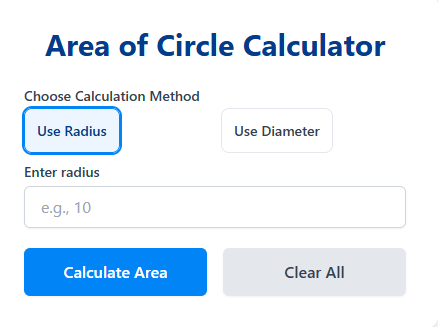
Step-by-Step Guide: How to Use the Online Area of Circle Calculator
Area of Circle Calculator Using our calculator is a breeze. Just follow these simple steps:
- Go to the Tool: Navigate to the Area of Circle Calculator on calculatorsera.com.
- Enter Your Measurement: In the input box, type the number for either your circle’s radius or its diameter.
- Select the Unit: From the dropdown menu, choose the unit you are using (e.g., cm, m, inches).
- Click “Calculate”: Press the calculate button and watch the magic happen!
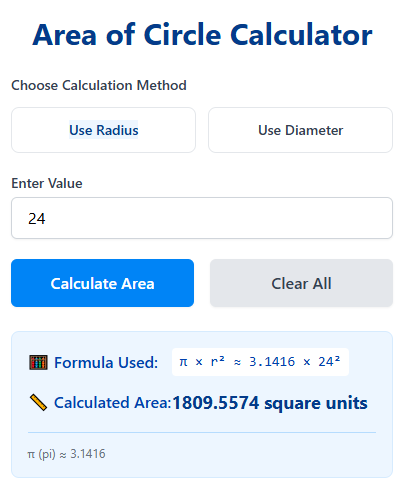
- Read Your Result: The calculated area will appear on the screen, clearly displayed in square units.
How to Calculate Area Manually (A Simple Example)
Area of Circle Calculator While the calculator is super handy, it’s also fun to know how to do it yourself! Let’s work through an example together.
Problem: You have a circular clock with a radius of 5 cm. What is its area?
Step 1: Write down the formula.
Area = π × r²
Step 2: Plug in the values you know.
We know π ≈ 3.1416 and the radius r = 5 cm.
So, Area = 3.1416 × (5 cm)²
Step 3: Square the radius.
(5 cm)² means 5 cm × 5 cm = 25 cm².
Step 4: Multiply by Pi.
Area = 3.1416 × 25 cm²
Step 5: Do the multiplication.
3.1416 × 25 = 78.54
Step 6: State your final answer.
The area of the clock is 78.54 cm².
See? You just did it! You can check your work with our circle area calculator to see if you got it right.
Common Use Cases & Real-Life Examples
Area of Circle Calculator You might be surprised how often we use the area of a circle in everyday life! Here are some fun examples:
- Painting a Round Table: If you want to paint the top of a round garden table, you need to know the area to figure out how much paint to buy.
- Building a Garden Pond: Planning a circular pond? Calculating the area helps you know how many stones or how much liner you’ll need.
- Buying a Circular Rug: Before you buy a round rug for your room, find its area to make sure it’s the right size to cover your floor space.
- Pizza Party!: Which is a better deal: one large 16-inch pizza or two medium 12-inch pizzas? Calculating the area of each will tell you which one gives you more pizza!
- Sports: Figuring out the area of the center circle on a basketball court or the penalty area on a soccer field.
- School Science Project: If you are building a model of a solar system, knowing the area of your planets (modeled as circles) can help you design them to scale.
Area vs. Circumference – What’s the Difference?
Area of Circle Calculator This is a common mix-up, but it’s easy to understand!
- Area is the space inside the circle. If you are filling the circle with water, paint, or grass, you care about the area.
- Circumference is the distance around the circle (the perimeter). If you are walking around the circle or putting a fence around it, you care about the circumference.
Simple Example: Think of a fried egg.
- The white part of the egg (the part you eat) is like the Area.
- The outer edge of the egg white is the Circumference.
They are related but measure two completely different things. If you need to find the circumference, check out our Perimeter Calculator on the site!
Units and Conversion Tips
When you calculate area, your answer is always in square units.
Area of Circle Calculator
- If you measure the radius in centimeters (cm), the area will be in square centimeters (cm²).
- If you measure in meters (m), the area is in square meters (m²).
- If you measure in inches (in), the area is in square inches (in²).
Sometimes, you might need to convert between units. Remember:
- 1 meter (m) = 100 centimeters (cm)
- So, 1 square meter (m²) = 10,000 square centimeters (cm²) (because 100 cm × 100 cm = 10,000 cm²).
Our calculator handles the units for you, so you don’t have to worry about these conversions!
Visualizing the Area: A Helpful Chart
Area of Circle Calculator It’s amazing to see how the area of a circle changes as the radius gets bigger. Because you are squaring the radius, the area grows very, very quickly! A small increase in the radius leads to a huge increase in area.
The chart below shows the area for circles with different radii. You can see how the area starts to shoot up as we move to the right!
What the chart shows: For a circle with a radius of 2, the area is about 12.5. But when the radius doubles to 4, the area doesn’t just double—it quadruples to about 50! This is why that large pizza is so much bigger than a medium one.
Benefits of Using an Online Area of Circle Calculator
Why should you use our calculator? Here are the top reasons:
- Super Accurate: It uses a highly precise value of π, so you get a more accurate answer than using 3.14.
- Saves Time: No more manual calculations. Get your answer in a flash!
- Easy to Use: Its simple design is perfect for everyone, especially students who are just learning.
- Helps You Learn: You can use it to check your homework answers, which helps you learn the concept better.
- Avoids Mistakes: It prevents common calculation errors, especially when squaring the radius or multiplying by π.
- Handles Any Unit: It seamlessly works with different measurement units.
Tips & Tricks for Circle Area Calculations
- Rounding Rules: For schoolwork, your teacher will usually tell you whether to use π = 3.14, 22/7, or the π button on your calculator. For everyday use, 3.14 is just fine.
- Diameter vs. Radius: Remember, if you are given the diameter, just divide it by 2 to get the radius first. Our calculator can do this for you automatically!
- For Programming: If you are writing computer code, you would use
Math. PIto get the most accurate value. - Classroom Activity: A fun way to learn is to find circular objects at home (a plate, a coin, a lid) and measure their radius or diameter. First, calculate the area by hand, and then use the Area of Circle Calculator to check your work!
Frequently Asked Questions (FAQ) for Area of Circle Calculator
Can I use the diameter instead of the radius in the calculator?
Absolutely! Our Area of Circle Calculator has a smart function. You can enter either the radius or the diameter, and it will calculate the area correctly for you.
What if my radius is a decimal, like 3.5?
No problem at all! The calculator can handle whole numbers, decimals, and even fractions. Just type the number in.
Why is the area so much bigger when the radius only increases a little?
Great question! It’s because of the “r²” in the formula. You are multiplying the radius by itself. So, if the radius gets twice as big, the area becomes four times bigger!
Is circumference the same as area?
No, they are different. Area is the space inside (like the pizza crust and toppings). Circumference is the distance around (the outer crust edge).
How accurate is the calculator’s result?
It’s extremely accurate because it uses π carried out to many decimal places, far more than a human would typically use in a manual calculation.
Can I calculate the area if I only know the circumference?
Yes, but it takes two steps. First, you use the circumference to find the radius (Radius = Circumference / (2 × π)), and then you use the radius to find the area. Our calculator is designed for radius or diameter, but you could use other tools on our site, like an Age Calculator for time-based problems, to help break down multi-step questions.
What does ‘squared’ mean?
“Squared” means a number multiplied by itself. For example, 5 squared (5²) is 5 × 5 = 25. We say it’s “squared” because that’s the area of a square with sides of length 5!
Why is Pi used for circles?
Pi (π) is a fundamental constant in mathematics. It’s the special ratio between a circle’s circumference and its diameter. This ratio is the same for every single circle, which is why it’s so important in circle formulas. You can learn more about its history on its Wikipedia page.
Conclusion
And there you have it! You are now a whiz at understanding the area of a circle. You know the formula, you’ve seen real-life examples, and you’ve learned why it’s such a useful thing to know.
The next time you have a circle to measure, don’t stress about the math. Let our Area of Circle Calculator do the work for you. It’s fast, free, and accurate. Whether you’re working on a school project, a DIY craft, or just satisfying your curiosity, it’s the perfect tool for the job.
Ready to try it? Head over to calculatorsera.com and find the Area of Circle Calculator now! Be sure to explore our other helpful tools too, like our full suite of Geometry Tools. Share it with your friends and classmates to make math time a breeze
Thank you for reading this post, don't forget to subscribe!