Profit Margin Calculator
Profit: $0.00
Profit Margin (%): 0%
10 Powerful Ways to Use a Profit Margin Calculator for Smarter Business Growth
A Profit Margin Calculator is one of the simplest but most useful tools you can use in your business, shop, or online work. It helps you see how much profit you make from every sale. Whether you run a small shop, a growing online store, or a big business, this calculator saves time, removes confusion, and gives you clear results instantly.
Many people struggle with profit margin formulas because they look confusing. But with a Profit Margin Calculator, anyone can understand their profit percentage in seconds. This page is made for business owners, students, shopkeepers, freelancers, and anyone who wants quick and accurate profit margin results.

In this guide, you will learn what a Profit Margin Calculator is, how it works, how you can use it, its benefits, tips, mistakes to avoid, real-life examples, and how it helps different types of users. Everything is written in a friendly, simple tone, so even a 5th-grade student can understand it easily.
Table of Contents
What is a Profit Margin Calculator?
A Profit Margin Calculator is a simple online tool that helps you find out how much profit you earn as a percentage. It takes two basic values:
- Cost Price (CP)
- Selling Price (SP)
Then it calculates:
- Profit Amount
- Profit Percentage (Profit Margin)
The formula used is:
Profit Margin (%) = (Profit ÷ Selling Price) × 100
But you don’t have to remember any formulas when you use an online Profit Margin Calculator because it does all the work for you.
Simple Example
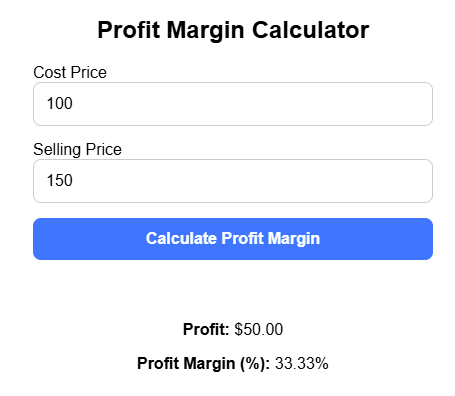
If you buy a product for $100 and sell it for $150, your profit is:
- Profit = 150 – 100 = $50
- Profit Margin = (50 ÷ 150) × 100 = 33.33%
The calculator shows this instantly.
This is why people love using a free Profit Margin Calculator — it is fast, simple, and 100% accurate.
Why Use a Profit Margin Calculator?
There are many reasons why people like to use tools like this. Let’s look at the most important benefits:
1. It Saves Your Time
Instead of calculating manually, you can get results in one click. This is very helpful when you calculate profit many times a day.
2. It Is Easy for Everyone
Even if you are not good at math, you can calculate your profit margin like a pro.
3. It Shows 100% Accurate Results
You will never worry about mistakes. The calculator uses the correct formula every time.
4. It Helps You Make Better Business Decisions
You can quickly check:
- Am I selling at the right price?
- Should I increase or decrease the price?
- How much profit do I make per item?
5. It Is Free and Online
Our free Profit Margin Calculator works on mobile, tablet, and computer without installing any app.
6. Perfect for Shops, Online Stores, and Businesses
Every seller wants to know how much profit they are making. This calculator makes it quick and easy.
How to Use Our Profit Margin Calculator Step by Step
Using our online Profit Margin Calculator is extremely easy. Just follow these steps:
Step 1: Enter Cost Price (CP)
This is the amount you spend to buy or make the product.
Step 2: Enter Selling Price (SP)
This is the price at which you sell the product.
Step 3: Click the “Calculate” Button
The calculator will instantly process your values.
Step 4: View Your Results
You will see:
- Profit Amount
- Profit Margin (%)
- Profit Percentage
- Total Return on Sale
Everything is shown clearly.
Step 5: Adjust Values if Needed
You can change CP or SP to test different price ideas.
This helps you plan smarter pricing strategies.
Real-Life Examples of Using a Profit Margin Calculator
Let’s understand how people use this tool in real situations.
Example 1: Shopkeeper Selling Clothes
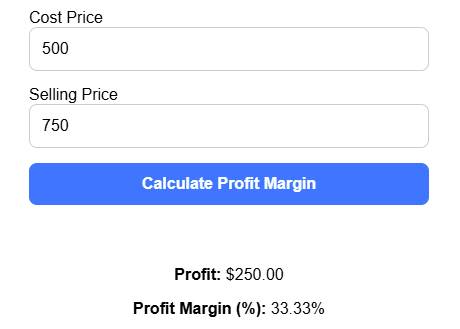
A shopkeeper buys a shirt for $500 and sells it for $750.
- Profit = 750 – 500 = $250
- Profit Margin = (250 ÷ 750) × 100 = 33.33%
The calculator helps the shopkeeper decide whether this margin is enough.
Example 2: Online Store Selling Mobile Accessories
A seller buys a phone cover for $2 and sells it for $5.
- Profit = $3
- Profit Margin = (3 ÷ 5) × 100 = 60%
A high margin — the seller is doing great.
Example 3: Restaurant Pricing a Meal
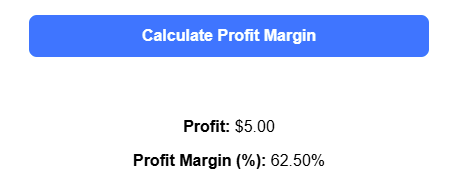
A restaurant prepares a dish that costs $3 and sells it for $8.
- Profit = $5
- Profit Margin = (5 ÷ 8) × 100 = 62.5%
The calculator helps restaurants understand which dishes earn the most profit.
Example 4: Freelancer Selling Digital Products
A freelancer sells an online template for $20 that costs $0 to produce.
Profit Margin = (20 ÷ 20) × 100 = 100%
A perfect example of high-profit digital work.
chart visualisation
This chart shows the profit margins of different products using simple visual bars. Each product is represented on the X-axis, and its profit margin percentage is shown on the Y-axis. For example, a shirt has a profit margin of 33.33%, a phone cover has 60%, a restaurant meal is 62.5%, and a digital template reaches a full 100% profit margin.
Using a chart like this helps users quickly understand which products are more profitable at a glance. It is especially useful for business owners, online sellers, and freelancers who want to compare their products’ performance visually. The chart also makes learning about profit margins easier for students or beginners, as numbers are translated into colourful, clear visual bars. Overall, it’s a simple way to make profit data more actionable and understandable.
Tips, Mistakes, and Best Practices
Let’s make your experience even better.
Common Mistakes People Make with Profit Margin
1. Confusing Profit with Profit Margin
Profit is the money you earn.
Profit margin is the percentage of profit.
Many people mix these up.
2. Entering Wrong CP or SP
Even small mistakes can change the margin.
3. Forgetting Additional Costs
Sometimes, extra costs like packaging or shipping are ignored.
4. Trying to Calculate Mentally
This leads to errors. It’s better to use the calculator.
Helpful Tips to Get Better Results
1. Always Use Exact Cost Values
Include:
- Packaging cost
- Shipping cost
- Labor cost
2. Try Testing Different Prices
Use the calculator to check how price changes affect your profit margin.
3. Keep Your Profit Margin Healthy
Every business has different ideal margins. Use the calculator to find your best range.
4. Use the Calculator Daily
It keeps your pricing updated and profitable.
Profit Margin Calculator for Different Users
This tool is not only for business owners. Many people find it helpful.
1. Students
Students use it for:
- Homework
- Projects
- Business assignments
They understand concepts faster.
2. Shopkeepers
Shopkeepers can quickly check daily product margins.
3. Small Businesses
Small businesses use it to plan prices, manage margins, and increase profits.
4. Online Sellers
Amazon, eBay, Etsy, Daraz, Shopify, and social media sellers use this tool to decide the right selling price.
5. Freelancers
Freelancers use it to set their service pricing.
6. Restaurant Owners
Restaurants use it for food costing.
7. Wholesalers
Wholesalers calculate margins on bulk items.
8. Normal Users
Even if you are not a business owner, it helps you understand product costs and profits.
Frequently Asked Questions (FAQs)
Here are the most asked questions:
What is a Profit Margin Calculator?
A Profit Margin Calculator is a simple online tool that helps you find out how much profit you make from selling a product or service. It takes your cost price and selling price and instantly shows your profit amount and profit percentage. This saves you from doing long calculations and gives you a clear understanding of how much money you actually earn from each sale.
How do I use a Profit Margin Calculator?
Using the calculator is very easy. All you need to do is enter your cost price and selling price. After that, click or tap the “Calculate” button. The tool will immediately show your total profit, profit margin percentage, and return on sale. It works in seconds and does all the math for you, so you don’t need to think about formulas.
Is this calculator accurate?
Yes, the calculator is fully accurate because it uses the standard profit margin formula every time. It removes mistakes that usually happen in manual calculations. Whether you enter small numbers or big values, the calculator gives the same level of accuracy, making it reliable for business use.
Can I use it for business?
Absolutely. This calculator is perfect for all types of businesses—small shops, online stores, wholesalers, restaurants, freelancers, and even large companies. Anyone who buys and sells products or services can use it to check if their pricing is correct and if they are making enough profit.
Is this a free Profit Margin Calculator?
Yes, it is completely free. You don’t have to pay for anything, sign up, or install an app. You can use it as many times as you want without any cost. It’s designed to help users save time and understand their profits without spending money.
Do I need any apps or software to use it?
No, you don’t need any app or software. The calculator works directly in your web browser—whether you’re on a phone, tablet, or computer. Just open the webpage, enter your values, and get instant results.
Can students use it for learning?
Yes, students can use this calculator for school homework, assignments, and business studies projects. It makes learning easier by showing how profit and profit margins actually work in real life. It’s also great for beginners who are learning basic financial concepts.
Can I calculate profit margin manually?
Yes, you can calculate it manually using formulas, but it can take time and may lead to mistakes, especially when dealing with many products. Using the calculator is much faster and more accurate because it has the formula built in. One click gives you the correct result every time.
What values do I need to enter?
You only need two numbers:
Cost Price (CP) – what you spent to buy or make the product
Selling Price (SP) – the price at which you sell it
Once you enter these two values, the calculator does the rest automatically, giving you profit and margin details.
What is considered a good profit margin?
A “good” profit margin depends on your type of business. Some industries work on small margins like 5–10%, while others go as high as 50–80%. The higher the margin, the better your business is performing. Using this calculator helps you see if your margins are strong enough or if you need to adjust your pricing.
Does the calculator work on mobile devices?
Yes, the calculator is fully mobile-friendly. You can use it on any smartphone just like you use it on a laptop. The layout adjusts automatically, making it easy to enter values and read the results without zooming or scrolling too much.
Can I try different selling prices to compare margins?
Yes! This tool is perfect for testing and comparing different price ideas. Simply change the selling price and click calculate again. This helps you see how small pricing changes affect your profit margin, making it easier to plan smart pricing strategies.
Final Thoughts on Profit Margin Calculator
A Profit Margin Calculator is one of the simplest and most powerful tools you can use when working with products, pricing, budgeting, or business planning. Whether you run a small shop, an online store, or a growing company, understanding your profit margin is one of the most important parts of doing business. This calculator makes the whole process easier by giving you clear and accurate results in just a few seconds.
The biggest benefit of using a calculator like this is the time it saves. You don’t have to sit with a calculator, write formulas, or double-check your numbers again and again. With just one click, you get the exact profit amount and profit percentage. This means fewer errors, less confusion, and more confidence in your business decisions. It removes all the guesswork and lets you focus on what truly matters — growing your business.
Another great advantage is how beginner-friendly it is. Even if you are not good with numbers, you can still understand your profit margin without any stress. And if you are an expert or someone who deals with pricing every day, this calculator helps you work faster and compare different price ideas instantly. It’s perfect for planning, testing new strategies, and checking if your selling price is right.
The tool also works for many different kinds of users. Shopkeepers can calculate margins on daily products. Online sellers can check the profit on digital and physical items. Freelancers can plan their service pricing. Students can learn financial concepts more easily. And business owners can use it to evaluate performance and plan the next step.
At the end of the day, a Profit Margin Calculator helps you see the true picture of your earnings. It helps you stay organised, set better prices, and grow with confidence. If you want fast, simple, and accurate results, this calculator is the perfect tool for you.
Try our calculator now and experience how easy and helpful it is. Use it to make smarter choices for your shop, business, online store, or everyday work — and take your profits in the right direction.
Thank you for reading this post, don't forget to subscribe!